
Stock take · Physical inventory · Cycle counting
Three systems for data collection in large uniform warehouses — with live feedback and integration into your warehouse management system.
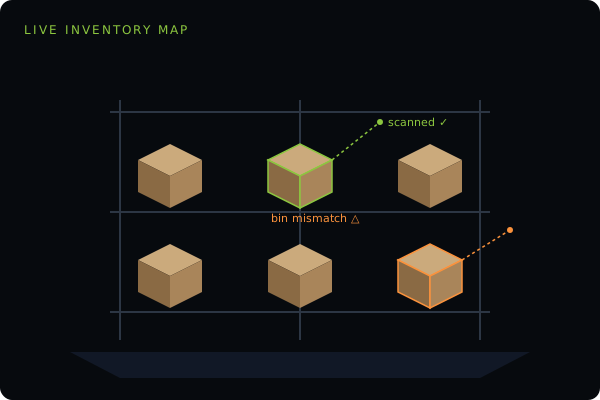
You asked
"Which bins weren't scanned this cycle?"
DroneScan AI
6 bins — mostly Aisle B, top rack.
Flagged for re-fly next pass.
AI
DroneScan understands plain English. Ask a question about your latest count — "which bins weren't scanned this cycle?", "what's the variance since last stocktake?" — and get a governed answer with the key figures already flagged, not a raw export you have to interpret yourself.
DroneScan's systems are built, developed and managed by humans — engineers with years of experience in robotics, drones and warehouse inventory. We use AI in our own development and testing, which lets us respond rapidly to new requirements and customise the system around you.
Inventory
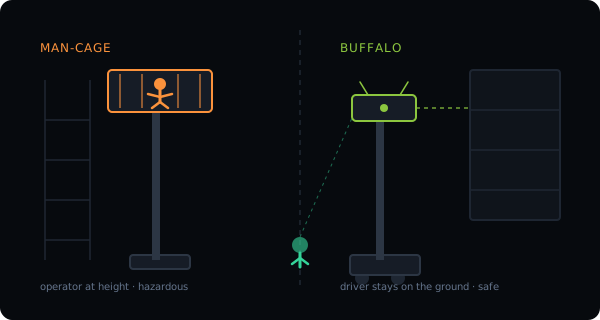
Traditional methods of scanning stock involve lifting staff up to great heights using a forklift. DroneScan has developed three robotic systems for data collection in large uniform warehouses, providing live feedback and integration with warehouse management systems.
They have proven to save hundreds of man-hours — but more importantly, they provide a safer alternative to labour-intensive methods involving reach trucks, forklifts, man-cages and scissor-lifts.
How a count runs
The only preparation is loading a file of the warehouse contents into the DroneScan database.
The Hummingbird, Buffalo or Barcode Bully unit sets up and runs to collect data. Hummingbird and Buffalo set up in 10 minutes and pack away in 5.
During or after scanning, reports and files are generated and sent to the warehouse manager or uploaded directly into the WMS.
Both the Hummingbird and Buffalo systems are portable, so one unit can be used across different warehouses. They come with robust travel cases, and the Hummingbird system can be transported within airline baggage weight allowances.
Live reporting

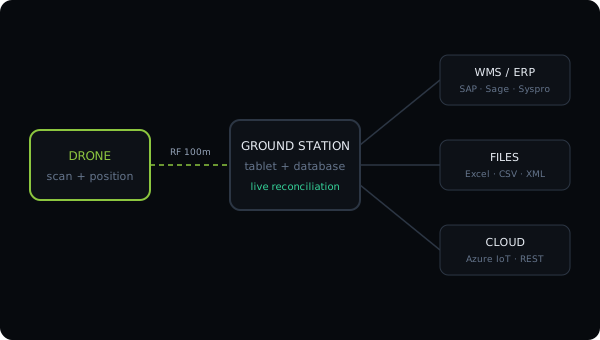
The ground station tablet communicates with the drone over a peer-to-peer RF connection, leaving the tablet's WiFi free to talk to your network. The interface is simplified and optimised for touch, letting the operator set scanning frequency and range and interact with the virtual warehouse model.

A high-visibility display is mounted at an ergonomic angle so it is readable from the ground in flight. It shows an incremental scan number plus a verdict: OK when the barcode is in the correct location, BIN ERR when it is in the wrong one, and NOT FOUND when it is absent from the provided data. Bin location and remaining battery are shown alongside.

Alongside the display, the operator hears a loud beep after each scan and sees a flashing bright light as a success indicator — so attention stays on the drone, not the tablet.

Inspecting item condition or verifying contents is usually manual. With cameras fitted, DroneScan captures still images for later processing or a live FPV video feed. Images upload to the server and link to the item in the warehouse software for retrieval and reporting.
Integration
The drone logs its data to the DroneScan database, and the ground station software integrates to customer systems, files and the cloud — not only to store scanned data, but to feed position and navigation information back to the drone.
Customised integration can be developed using:
We have experience integrating to ERP systems such as SAP, Sage and Syspro, and can build customised systems around unique requirements.
A short checklist covers racking, barcodes and layout.